
- Home
- seo for local businesses
1

How to Optimize Your Google Business Profile and Beat the Competition

If you have a local business—no matter if you’re a doctor, attorney, or run any kind of service-based company—getting new customers is probably at the top of your mind. But there’s one thing you absolutely can’t ignore if you want to stand out and get those customers: your Google Business Profile.
You know those boxes you see at the top of Google when you type in something like “psychiatrist Fort Lauderdale” or “electrician near me,” and suddenly there’s a list of local businesses with reviews and maybe even pictures? That’s your Google Business Profile (formerly known as Google My Business or GMB). And that’s where people go when they’re looking for a local service to trust.
In this detailed guide, I’m going to show you exactly how to optimize that profile—using a real-world example—to outrank your competitors, get more leads, and attract more customers right from your own neighborhood.
Table of Contents
- Why Your Google Business Profile Is Crucial
- The Foundation: Fill Out Everything—Leave Nothing Blank
- Category and Service Optimization
- Nailing the Locality: Geo-Optimization
- Show Off with Photos and Videos
- The Power of Social Media Links
- Weekly Posts: Keeping Your Profile Fresh
- Review Dominance With Smart Automation and Filtering
- Real-Time Example: A Psychiatrist’s Journey to the Top
- The Ultimate Google Business Profile Checklist
- Bringing It All Together—Why Most Competitors Will Never Catch Up
- Final Words & Free Resources
Why Your Google Business Profile Is Crucial
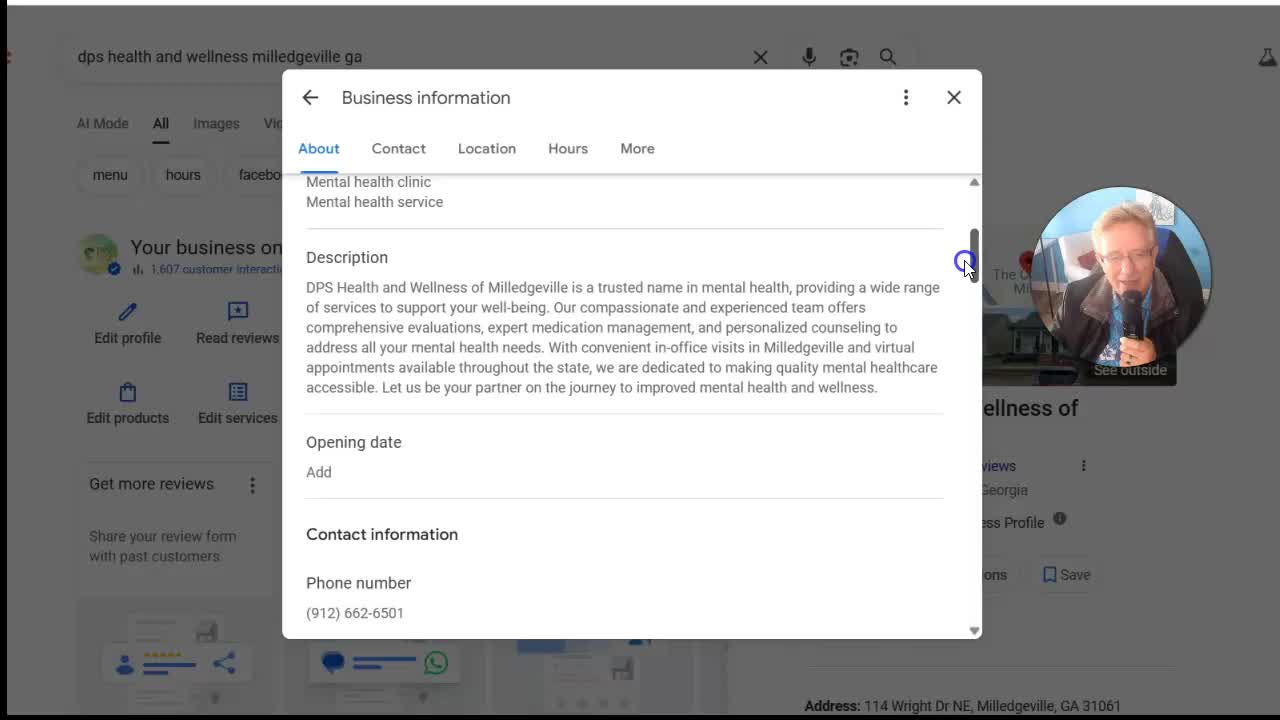
When people in your area need a service, they turn to Google. And when they do, the first thing they see isn’t your website—it’s your Google Business Profile.
These profiles appear right at the top of local searches and Google Maps. They show off your star rating, reviews, photos, business hours, and sometimes even links to your social media or booking system.
“You have to be here, and you have to outrank your competitors. That is exactly what I’m going to show you how to do with a real world example.”
Key advantages of an optimized profile:
- Shows up first for “near me” and local service searches
- Instantly builds trust with reviews and photos
- Drives phone calls, directions requests, and website clicks
- 80% of customers use Google to find local business info!
If your profile isn’t there (or isn’t set up the right way), you’re invisible. Simple as that.
The Foundation: Fill Out Everything
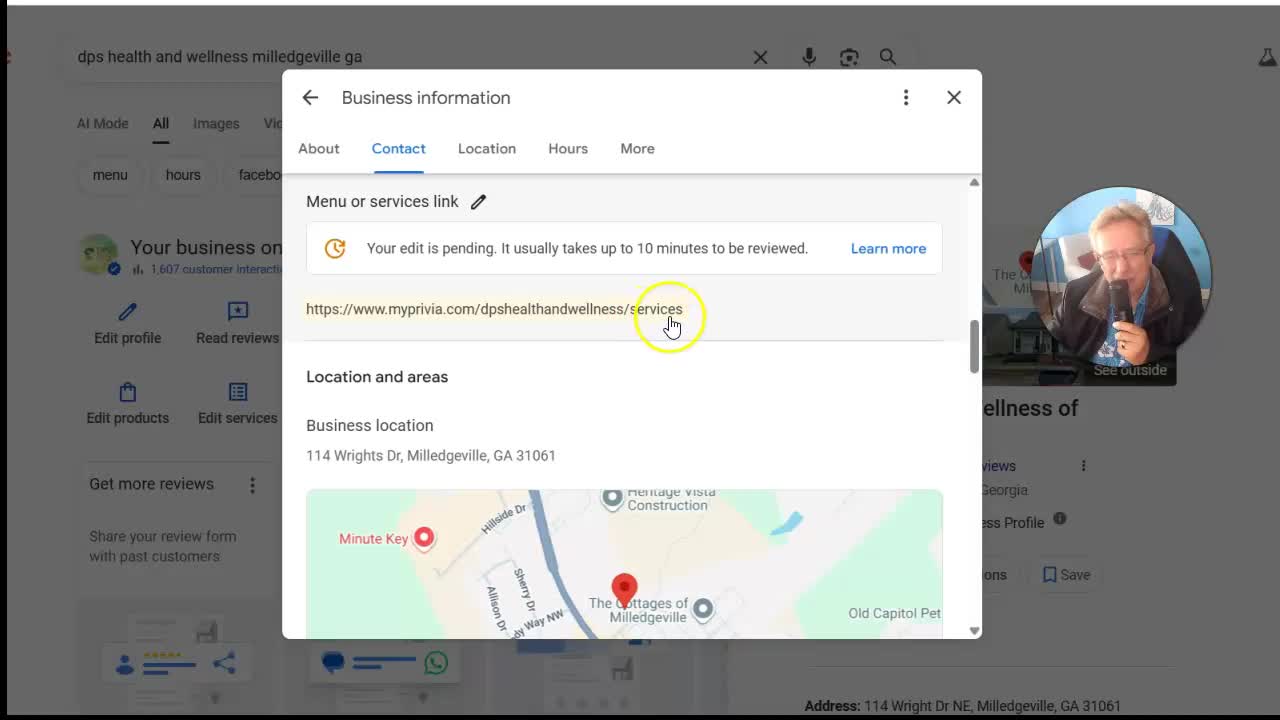
First rule: Don’t leave anything blank.
It sounds basic, but the majority of businesses skip sections. Every blank field is a missed chance to tell Google (and your audience) what you do and why you’re the best.
What to Fill Out
- Business Name (exact as it appears in real life)
- Primary and Additional Categories (Don’t just pick “Doctor” or “Restaurant”—get specific!)
- Full description (loaded with keywords and your location)
- Address (or service area)
- Website
- Phone Number
- Hours of Operation
- Services, Products, or Menu (in a detailed list)
- Amenities & Accessibility Info
- Photos and Videos
- Social Media Profiles
In my example, the psychiatrist only had the “psychiatrist” category. That’s it! We completely reworked the profile, packed in all the details, and filled out every possible field.
“You can’t skip anything. For example, you come to the profile here and everything we could possibly fill out is here. Now I’ve added things as well.”
Checklist: Don’t Ignore These Small Details!
- [x] Accessibility options (wheelchair access, etc.)
- [x] Telehealth/Virtual service options
- [x] Business holiday hours
- [x] List separate services for each unique offering
If there’s a blank space on your GBP dash, fill it in.
Category and Service Optimization
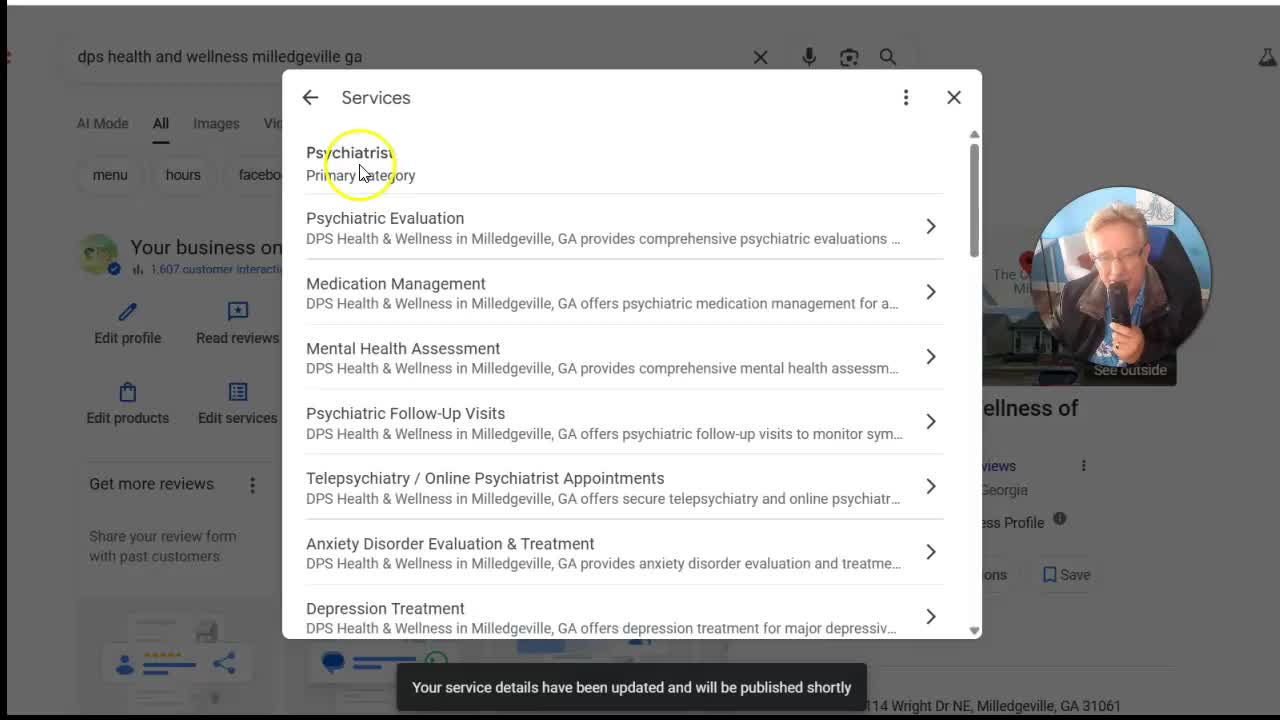
Your business category is more than just a label—it tells Google precisely what kind of searches to show you for.
Add More Than the Main Category
Most businesses just pick one—like “psychiatrist.” Don’t stop there!
Example:
- Main Category: Psychiatrist
- Subcategories:
- Medical Clinic
- Mental Health Clinic
- Telehealth Service
List every service you offer! Go deep—if you do ADHD evaluations, medication management, or therapy, list all of them.
Why multiple categories matter:
- Capture more types of searches (e.g., “depression therapy near me” vs. “psychiatrist near me”)
- Outrank competitors who only use generic categories
- Strengthen your authority in more local service niches
Pro Tip: If your website has separate pages for each service, link to each from your profile. If not, at least link to one comprehensive services page.
Nailing the Locality: Geo-Optimization
Your profile isn’t just for anybody; it’s for people who need your service where you are. That’s where keyword optimization matters.
Use your city, town, or neighborhood in your description and service listings.
“We’ve optimized this description for the location and also the services. Everything we can fill out, we fill out as optimized as possible.”
Sample Description:
“We’re a leading psychiatrist clinic based in Milledgeville, GA, offering in-person and telehealth psychiatric care across Georgia. Our team specializes in depression treatment, anxiety management, ADHD evaluation, and more.”
Tips:
- Mention your city or service area several times in:
- The business description
- Service descriptions
- Reviews (when possible)
- If you offer telehealth or remote services, shout it out (and list all regions!)
This clear geo-targeting tells Google, “Hey! We’re the psychiatrist for Milledgeville and all of Georgia for telehealth.”
Show Off with Photos and Videos
Google LOVES fresh, real photos and videos. And so do your customers.
Most businesses upload a logo and a shot of their waiting room… and then nothing. Don’t make that mistake!
Recommended Photo Types
- Exterior of your building (so people recognize it!)
- Interior shots (offices, lobby, exam rooms)
- Your team in action
- Community moments or events
- New services or equipment
Why keep posting new photos?
Uploading photos regularly tells Google your business is active and engaged. It also shows potential customers what to expect.
“If you just, you know, put one or two photos, it’s not good enough. You have to consistently add content here to the photos.”
Videos: Secret Weapon!
If you can, shoot short videos—even 60 seconds—about what you do, introduce your staff, or answer common questions. Hook these into your Google Business profile and YouTube.
The Power of Social Media Links
You’d be amazed how many local businesses don’t put their social media links on their profile. This is a big missed opportunity!
When you add YouTube, Instagram, Facebook, TikTok, etc., you not only give customers more ways to connect—you also signal to Google that you’re the “real deal.”
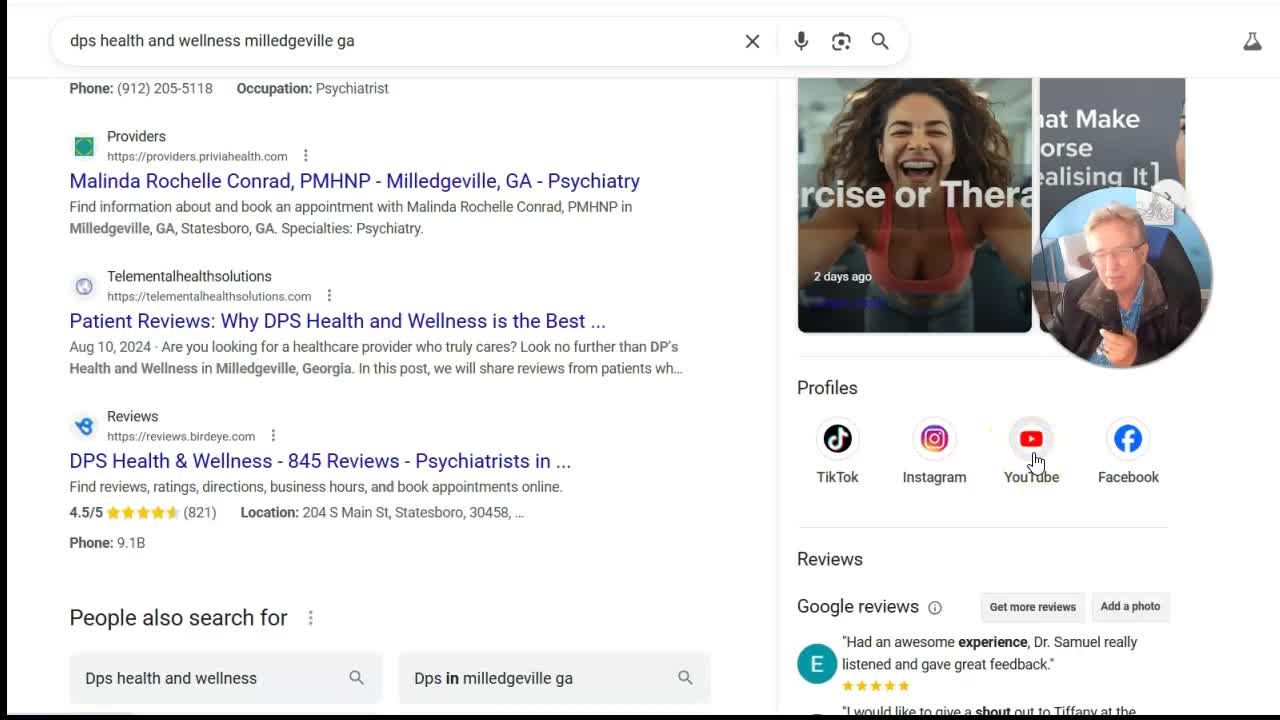
In my case study, the psychiatrist had zero social accounts linked. We launched a YouTube channel (over 13,000 subscribers now!), plus Instagram, Facebook, and TikTok.
“Their potential clients can come here and click on the YouTube… We’ve done 107 videos for them… This gives you tremendous quality credibility.”
Why it matters:
- Clients get to “meet” you before calling
- You look current and trustworthy
- Videos on YouTube (especially educational ones) bring in tons of free traffic
Weekly Posts: Keeping Your Profile Fresh
Did you know you can post to your Google Business Profile, just like Facebook or Instagram? It’s a feature most businesses ignore, but it’s super powerful.
Post Types You Can Use:
- Announcements (“Now offering telehealth visits”)
- New blog posts
- Short tips or advice
- Promotional offers
- Links to YouTube videos
- Staff introductions
We schedule posts every week—for a whole year in advance—for the clinic. These posts keep the profile active, help boost SEO, and drive traffic to your website and social media.
“Every week they have posts coming out consistently bringing traffic back to their page, giving credibility. We did all these YouTube videos, so a lot of these posts go back to their YouTube videos.”
Synergy in action: More people see your videos > more YouTube traffic > more Google authority > more leads.
Review Dominance With Smart Automation and Filtering
Here’s the cold truth: The businesses with the most and best reviews nearly always show up first.
But getting reviews—and managing them—takes work. Most businesses don’t ask every customer for a review, and when they get a bad one, it stings.
Automating the Review Process
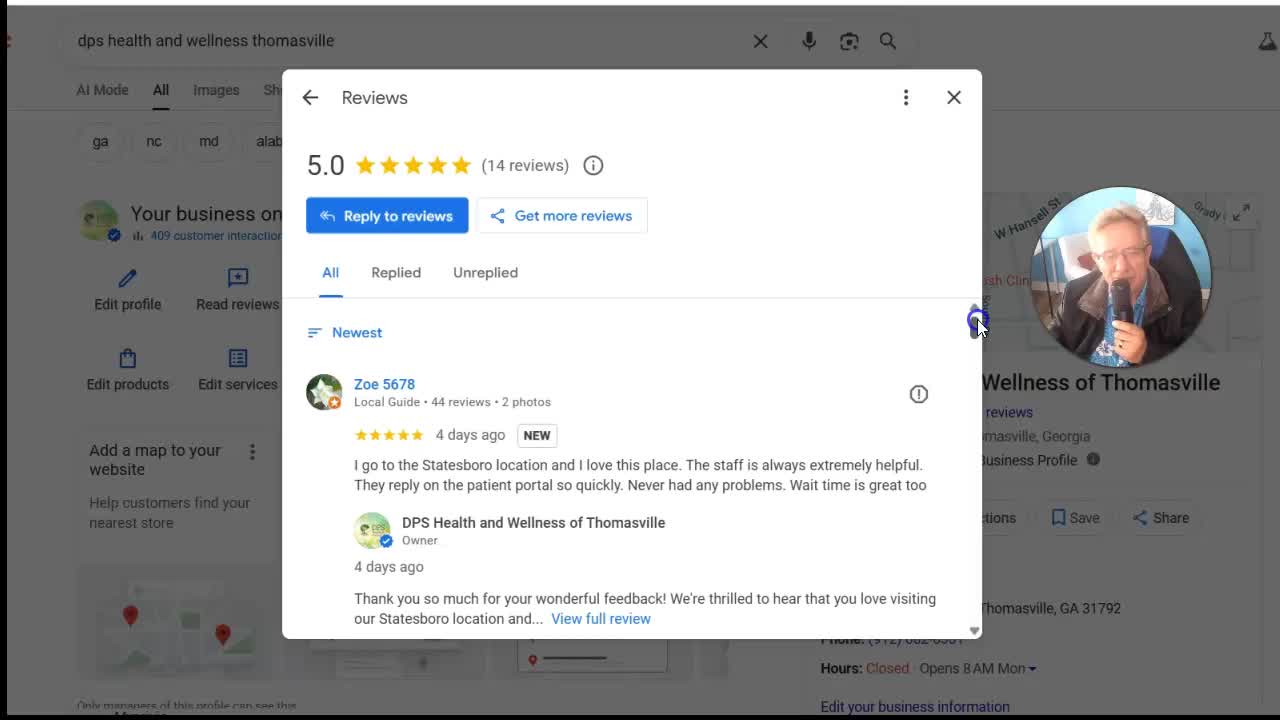
We use a simple system:
- After every service/appointment: Send an email or SMS to the client with a request to review.
- If they rate 5 stars: They are sent directly to your Google profile to leave a public review.
- If they rate 4 stars or less: They’re sent to a private feedback form to share what went wrong.
“Now the advantage is you get a chance to head off the bad review at the pass, right? … This will greatly diminish the number of negative reviews you get because you’ll have a chance to correct any issues.”
Important: You must always include a Google review link for transparency and to stay compliant with Google’s rules. (No “gating” allowed—don’t hide the review option from unhappy customers.)
AI-Powered Reply System
Business owners should reply to every review—it shows Google that you’re engaged and active. Our system makes this easy, using AI-generated, polite, and personal replies for every review.
“The doctor said he couldn’t write reviews better than these. He’s absolutely thrilled.”
Practical Steps for Review Domination
- Always request reviews after service
- Direct happy clients to your Google profile
- Handle negative feedback privately, but stay Google-compliant
- Reply to every single review (personalized)
- Don’t panic if you get a bad one—address it and (if possible) turn it around
Real-Time Example: A Psychiatrist’s Journey to the Top
Let’s tie all these tactics together with one real-world example.
The Clinic
- Psychiatrist based in Georgia with four locations
- Profile was barely filled out—just a name and basic info
- No social media, few photos, and only the “psychiatrist” category listed
Our Optimization Steps
1. Filled Out Every Field
- Added expanded business description
- Loaded up on services (with descriptions and local keywords)
- Included addresses for all locations
- Specified telehealth service area
2. Category Explosion
- Added multiple categories:
- Psychiatrist (primary)
- Medical Clinic
- Mental Health Clinic
- Listed out all individual services
3. Social Media Supercharge
- Created and linked YouTube, Facebook, Instagram, TikTok
- Filmed and posted 100+ videos (many topping 50,000 views!)
- Scheduled weekly Google posts linking back to videos
4. Snowballing Reviews
- Set up automatic review request system via email/SMS
- Automated AI replies to every review
- Drastically filtered out negative reviews by addressing feedback before it hits Google
5. Photo & Content Machine
- Added dozens of location, staff, and treatment photos
- Kept visual content updated monthly
The Results?
- Massive jump in Google local rankings
- Over 13,000 YouTube subscribers and thousands of video views (all free)
- Credibility through the roof (patients see real faces, real info)
- Consistent new leads and website visits
“This helps you rank it. Plus people come here and they see that you’re the real deal.”
The Ultimate Google Business Profile Checklist

Want to go step-by-step and make sure you don’t miss anything? Here’s the ultimate checklist. (Ask for my free detailed PDF below!)
Basic Info
- [x] Exact business name
- [x] Address(es) or service area (for service businesses)
- [x] Phone number and website link
- [x] Hours of operation (with holiday settings)
Categories & Services
- [x] Primary category
- [x] Additional categories (as many as apply)
- [x] List every service (with detailed descriptions)
- [x] Each service geotagged (e.g., “Counseling in Milledgeville, GA”)
- [x] Special options (e.g., telehealth, virtual consults)
- [x] Link to individual service pages (if possible)
Description
- [x] At least 750 characters, using relevant keywords
- [x] Mention city and service area several times
Visuals
- [x] Logo
- [x] Exterior and interior building shots
- [x] Team and equipment photos
- [x] Videos (uploaded directly or linked from YouTube)
- [x] Keep adding content every week/month
Social Presence
- [x] Linked Facebook, Instagram, TikTok, YouTube, etc.
- [x] Regular posts (bulk schedule in advance)
Engagement
- [x] Ask for reviews after every customer interaction
- [x] Filter and reply to reviews (preferably with AI)
- [x] Address negative feedback privately—but stay Google-compliant
Posting
- [x] Schedule weekly/biweekly Google posts
- [x] Link posts to latest videos, articles, or offers
Pro-Tip Extras
- [x] Enable messaging (if you can quickly respond)
- [x] List accessibility features (e.g., wheelchair ramp)
- [x] Add FAQs or Q&A to your profile
“If you’d like to get this free checklist, go ahead and comment ‘local leads’ in the comments below and I’ll send you this checklist as well.”
Bringing It All Together—Why Most Competitors Will Never Catch Up
Let’s be real: Most business owners won’t do all this. They’ll fill out the basics, hope for a few reviews, maybe upload one photo, and call it a day.
If you go above and beyond—fully complete your profile, post every week, answer every review, and build your authority on social and video—you will outrank 90% of your competition.
“The great thing is most of your competition is not doing this.”
And every piece works together. Your posts drive traffic to your videos; your videos bring trust and more leads via YouTube; more engagement and reviews push you higher in the Google rankings.
Final Words & Free Resources
Optimizing your Google Business Profile may seem like “just” a bunch of little steps. But put together, these steps are the difference between being invisible and being the first choice in your field.
I’ve helped countless local businesses—from mental health clinics to plumbers to lawyers—skyrocket their leads by dominating Google’s local results. The stories are always the same: The ones who take the time to fully optimize win. Every time.
If you want:
- A complete analysis of your Google My Business profile
- Done-for-you video creation, review management, and posting
- Access to my detailed Google Business Profile optimization checklist
Just leave a comment below with “local leads” or reach out using my contact info in the description.
“It’s about keeping it active, keeping it relevant and having you on top of it 100%. And we can do all of this for you as a service.”
Please don’t forget to:
- Subscribe to my YouTube channel for free local marketing tips
- Check out the pinned comment for a direct contact link
- Request the full checklist—it’s free!
Let’s go win those local leads. Your customers are searching for you—let’s make sure you’re the one they find.
Matthew May, QuickRegisterSEO.com
“Thank you so much. This is Matthew May, quick register SEO.com Please subscribe to my YouTube channel as well for more tips like this.”
Ready to dominate your local market? Fill out your Google Business Profile right, today!